|
COMP1406 - Tutorial
#10
Exceptions  |
 |
Purpose:
The purpose of this exercise is to have you create some Exception classes, then throw these exceptions when
appropriate and provide a catch handler
to catch the thrown exceptions.
Demonstration:
The demonstration program tries to collect input from the user to create a Person, an Address and a PhoneNumber object based on the information collected. The program is to use exception handling to screen out invalid input and continues to re-prompt the user until they provide valid input. Examine the Main.java class and see where the prompting and exception throwing is being done. Currently the code throws an IllegalNameSpellingException exception. It also throws a general Exception is there are not enough tokens in an address input to possibly be a valid address with postal code. The screen capture below shows the behaviour of the demo code. Notice that there are still several errors in the information collected including: a last name not capitalized, the word "street not capitalized, and an incorrectly formatted phone number. We will fix this problems with exception handling.
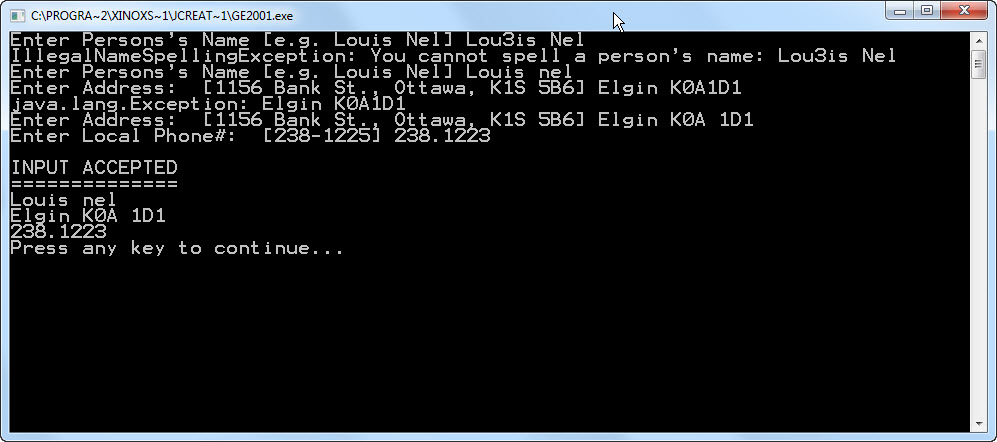
The Person
class demonstrates the structure of a class that throws exceptions, and
the main program shows how to catch those exceptions. The Person class's constructor currently will
throw an
IllegalNameSpellingException if the names contain characters
that are not letters. Also the Address
class currently throws a general Exception
if there are just too few tokens in the input string to be an address
and postal code. Examine the code to see how is done and how the
exceptions are caught.
Your task is to add new Exception classes and modify the Person, the Address and PhoneNumber classes so that the specific requirements below are satisfied. The main program has catch blocks to catch a general Exception object. You should replace these in the code with catch blocks that can catch the new types of exceptions that you create.
To complete this tutorial you will have to examine parts of the input strings collected from the user. The are many ways you can do this. You can use a for-loop to examine individual characters and look for separators like blanks. Alternatively you can use one of the String methods, like split(), that can break a string up into individual words or tokens.
Here are some useful String methods that might be helpful
aString.charAt(i); //returns the char at position i, counting
from 0, in the string aString
aString.substring(i,n); //returns a String that is the
substring of characters in aString from position i to n-1
aString.trim(); //returns a substring that is aString with leading and
trailing blanks removed
aString.split(" "); returns an String[] of the substrings of aString
delimited by blanks
For example, the following code
System.out.println("==============");
String test = "The 11 little foxes";
String[] sa = test.split(" ");
for(int i=0; i<sa.length; i++)
System.out.println(sa[i]);
will produce the following output:
==============
The
11
little
foxes
There are many other useful string methods. You should look at the Java API documentation for others you might find useful.
There are also useful Character methods that you can use to determine whether a character is a digit or a letter. Here are some useful expressions:
Character.isLetter( c ); //returns true if char c is a letter and false otherwise
Character.isDigit( c ); //returns true if char c is a digit and false otherwise
There are many other useful Character methods. You should look at the Java API documentation for others you might find useful.
Specific Requirements and Suggestions
Person Requirements
1) Person's names must not contain characters
other than letters, otherwise you should throw a IllegalNameSpellingException.
2) A Person's names
must start with a capital letter, otherwise you should throw a ProperNameNotCapitalizedException.
Address Requirements
1) Addresses must have at least a non-empty
string and a valid postal code, otherwise you should throw a IncompleteAddressException.
2) The names of streets, cities, (i.e. any
words in the address) must start with capital letters otherwise you
should throw an
ProperNameNotCapitalizedException.
3) The postal code should be of the form "
letter digit letter space digit letter digit" otherwise you should
throw an InvalidPostalCodeFormatException
4) The letters in the postal code should all
be capital letters otherwise you should throw an InvalidPostalCodeFormatException
Phone Number
Requirements)
Phone numbers can be 7 digits or 10 digits.
1) A 7 digit number must have
a dash between the 3rd and 4th digit. (e.g. 234-1233) otherwise
you should throw an
InvalidLocalPhoneNumberException. (Note there should not be
blanks before or after the dash).
2) A 10 digit number must have the
area code in brackets, a space between the area code and local 7-digits
and a dash between the 3rd and 4th digit of the 7 digit
portion. (e.g. (613)234-1233) otherwise you should throw an InvalidPhoneNumberException.
Note there should not be any blanks within the phone number.
To complete this tutorial it must not be
possible for the TA to enter data, and have that data accepted, if it
violates any of the above requirements.
When you have completed the code demonstrate to the tutorial TA that you have satisfied all the requirements. (You need to demonstrate your tutorials results to the TA to get credit for the tutorial. )