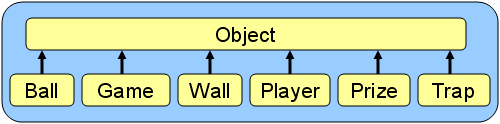
Run the test code. You should see the following
output:
Here
are
the
Game Objects:
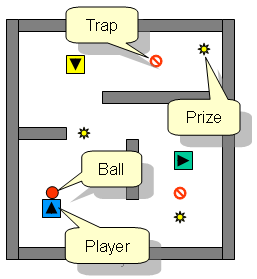
Wall at java.awt.Point[x=0,y=0]
with width 10 and height 200
Wall at java.awt.Point[x=10,y=0]
with width 170 and height 10
Wall at java.awt.Point[x=180,y=0]
with width 10 and height 200
Wall at
java.awt.Point[x=10,y=190] with width 170 and height 10
Wall at java.awt.Point[x=80,y=60]
with width 100 and height 10
Wall at java.awt.Point[x=10,y=90]
with width 40 and height 10
Wall at
java.awt.Point[x=100,y=100] with width 10 and height 50
Prize at
java.awt.Point[x=165,y=25] with value 1000
Prize at
java.awt.Point[x=65,y=95] with value 500
Prize at
java.awt.Point[x=145,y=165] with value 750
Trap at java.awt.Point[x=125,y=35]
Trap at
java.awt.Point[x=145,y=145]
Player Blue Guy at
java.awt.Point[x=38,y=156] facing 90 degrees
Player Yellow Guy at
java.awt.Point[x=55,y=37] facing 270 degrees
Player Green Guy at
java.awt.Point[x=147,y=116] facing 0 degrees
Ball at java.awt.Point[x=90,y=90]
facing 0 degrees going 0 pixels per
second
- Examine the classes and look at the attributes
(i.e., instance
variables). You will notice that there is a lot
of duplicate information. For example, Ball, Wall, Player, Prize
and Trap all keep track of a
location,
and
Ball and Player
both have a direction and speed.
This
is
not very
nice. To eliminate the duplication, we will re-organize the
classes by abstraction (i.e.,
by extracting the common attributes and behaviors). One
way of doing this would be to see what all objects have in
common. It seems that all objects except Game have a location. So we will
begin by getting that information out from the objects and storing it
in a common class which they can all inherit from.
- Create a
class called GameObject
that will store a single attribute called location of type Point (you'll need to import java.awt.Point). Create
a constructor in GameObject that
takes
an
initial location Point and
sets it. Compile
the class.
- Remove the location variable
from
the
Ball, Wall, Player, Prize
and Trap classes. You will
notice that none of these classes will
compile now since the constructor and
toString() methods both
make
use
of
the location variable.
- Adjust the Ball, Wall, Player, Prize
and Trap classes
so that they become subclasses of GameObject (i.e.,
simply
append
extends GameObject
after the class name is defined). The code will
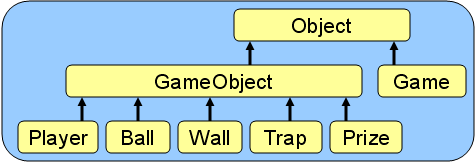
not yet compile properly. Here is the
new hierarchy:
- Try recompiling the Ball, Wall, Player, Prize
and Trap classes. You
should notice an error. The "cannot find symbol constructor GameObject()"
indicates that JAVA is trying to
find a zero-parameter constructor in the GameObject class.
It
is
doing this because in the constructors for Ball, Wall, Player, Prize
and Trap classes, JAVA is trying
to first do super() ... which
means it is trying to call GameObject(),
which
does
not exist. As it turns out, whenever
you write a constructor, there is
automatically an implicit call to the super class's zero-parameter
constructor. In our case, the GameObject
class has a 1-parameter constructor, so things don't
work.
To change this default behavior, replace
the
this.location = loc;
code with super(loc) on
the first line of your constructors in the Ball, Wall, Player, Prize
and Trap classes. Now java will
use this new constructor call and not
attempt to call the one that does not exist. The classes should
now compile.
Basically, what we just did was move the initialization code for the location attribute into the GameObject class and we are
"calling" this code from the other 5 constructors through super(loc)
... passing it the initial loc
that we want to use. If you do not understand what
happened, ask the TA.
Run the test program to make sure
that it still
works. At this point, 5 of our classes are now successfully
inheriting the location attribute.
- Notice also that both the Player and Ball classes
have a direction and speed attribute. That
means, they have something in common ... they are both kinds of GameObjects that
can
move
around. To avoid duplication, we will want to use
inheritance again. We are going to abstract out even
further resulting in more changes to the hierarchy.
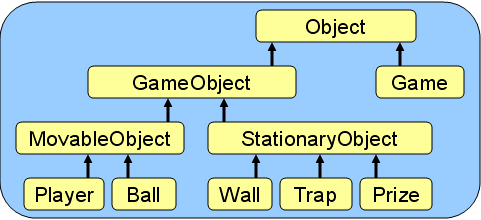
- Create two subclasses of GameObject called
MovableObject
and StationaryObject.
- Adjust the hierarchy so that Player and Ball extend
(i.e., inherit from) MovableObject while
Wall,
Trap and
Prize extend
StationaryObject
(none of the classes will compile yet though):
- Remove the direction and
speed attributes from Player and Ball, and
copy them into MovableObject.
Don't
try
compiling yet, as things are still a bit messed up.
- In MovableObject,
create
a
single constructor that takes a direction d, speed s and location loc as its 3 parameters (in that
order) and in the
first line it should make the call super(loc); to
its
superclass'
constructor (don't forget to import the Point class again).
Make sure that your MovableObject class
now
compiles
ok.
- Adjust the first few
lines of the Player
and Ball
constructors in order to get the code to compile by calling
the
new constructor that you made in MovableObject
which now takes 3 parameters, not just the one. When making your
changes ... think about which initial direction, speed and location
that you want to pass as parameters ... are they fixed values or
parameters ? Your Ball constructor should have 2 lines
remaining in it once you are done and your Player constructor should have 5
lines. Both Ball and Player should now compile ok.
- Add a constructor to the StationaryObject class
which
calls super(loc); to
simply
set
the initial location.
Although
there
are no shared attributes between Wall, Trap and Prize, we
will still make them inherit from StationaryObject in
case
we
need to add additional shared attributes or behaviors in the
future. Make sure that the StationaryObject,
Wall,
Trap and
Prize classes
all
compile
ok before you continue.
- Now we will complete our abstraction process by making some
of the classes Abstract.
In our program, we do not want to make any
instances of GameObject,
MovableObject
or StationaryObject.
Instead,
we
will force everyone to make instances of the more specific
objects of Ball, Wall, Player, Prize
and Trap.
To
do
this, we will make GameObject, MovableObject and
StationaryObject
to all be abstract classes.
- First, we should test these classes before we move
on. Add the following lines of code in the GameTestProgram (just
before
the
walls are added) which will create instances of GameObject, MovableObject and
StationaryObject.
Re-compile
and
run the code and then make sure that you notice the
three new objects created:
//
Simple
Test
g.add(new GameObject(new Point(0,0)));
g.add(new MovableObject(0,
0, new Point(0,0)));
g.add(new StationaryObject(new Point(0,0)));
The output should be something
like this:
Here
are the Game Objects:
GameObject@72093dcd
MovableObject@3cb89838
StationaryObject@7b11a3ac
Wall
at java.awt.Point[x=0,y=0] with width 10 and height 200
...
- Add the keyword abstract before
the
word
class at
the top of the GameObject, MovableObject and
StationaryObject
class definitions and then recompile
them. DO NOT RE-COMPILE THE GameTestProgram.
Here
is
what we did:
- Without re-compiling, re-run the GameTestProgram
class. You should get an exception as follows: java.lang.InstantiationError: GameObject.
That
is
because we are not allowed to instantiate
(i.e., create) any GameObjects,
because they are now abstract.
(There is a setting in JCreator though, that may cause your
run button to first re-compile... if you don't get the above error, do
not worry ... all is fine). Re-compile the GameTestProgram class.
The
compiler
will tell you that you cannot make instances of GameObject, MovableObject,
nor
StationaryObject.
- Remove these 3 lines of code from the test
program that you just added and the code should compile
and run as before. Remember ... making a class abstract does not change the way it
works, it just means that
you can no longer create
instances of that class directly.
- Now we will make behavior for our objects to allow them to
update themselves.
- Create the following abstract
method in the GameObject class
and
then
recompile it:
abstract void update();
Your code will still run as
before.
- Try
recompiling the Wall
class. You will get the following error: Wall is not abstract and does not
override abstract method update()
in GameObject.
This is JAVA's way of telling you that the Wall class
did not implement the update()
method and that it is "supposed to" since it now inherits from GameObject.
In
fact,
Player,
Ball, Prize
and Trap classes will also need to implement
this method. Implement this update() method
in the StationaryObject
class but leave the body of the method blank (i.e., do
nothing because stationary objects do not need to update
since they
do not move) and then re-compile the StationaryObject class.
- Re-compile the Wall, Prize
and Trap classes. They
should
compile OK now because they inherit the "blank" update() method.
- Write the following update()
method in the MovableObject
class as follows which will allow MovableObjects to
move
forward
and redraw themselves whenever asked to
update (don't compile yet):
void update() {
this.moveForward();
this.draw();
}
- Write this moveForward()
method in MovableObject now as
follows which will move the object to its next location based on its
speed, direction and current location (don't compile yet):
void moveForward() {
if (this.speed
>
0)
this.location.translate((int)(Math.cos(Math.toRadians(this.direction))
* this.speed),
(int)(Math.sin(Math.toRadians(this.direction))
* this.speed));
}
- Create the following abstract
method in MovableObject and
then
re-compile
the class:
abstract void draw();
What have we just done
? We set our code up so that all MovableObjects will
update
their
location by
moving ahead in the direction that
it
is
facing by an amount indicated by the speed.
Don't worry
about the math here. By making the draw() method
abstract,
this
means that the subclasses Player and Ball must
each implement the method in their own unique way. Of
course, in reality we would need to do much more in the moveForward() method
...
such
as checking for collisions and whether or not we fell into a
trap or found a prize ... but for this tutorial we will not go that far.
- The code in MovableObject now
compiles,
but
the Player and
Ball classes
will
not (try it if you don't believe me). We need to implement a draw() method in those
classes. Create a simple draw()
method in these two classes
that simply displays (using System.out.println())
the
location, speed and direction of the
object in a format like this:
Player is at (110,100)
facing 0
degrees and moving at 10 pixels per
second
Ball
is at (110,100)
moving in a direction of 0
degrees at 10
pixels per
second
Of course, in a real game this
method would
actually draw the player or ball on the screen, but we will not discuss
this here.
Hopefully you see the advantage of abstract classes and
methods.
If we now decided to add another kind of movable object, we would
inherit attributes and behavior for free. All we would need
to do is
write a
draw() method ... and the other
methods we would get for free (e.g., update()
and moveForward()).
- Now we will make a Ball and
Player move in the game.
- In the Ball class,
override the default inherited update()
method from the MovableObject
class by writing your own update()
method that causes the ball to decelerate (i.e., slow
down) after moving
forward. That is, upon updating, Ball objects
should move forward, then decrease their speed by one and then draw
themselves. Make sure that the speed never becomes negative
though.
- Test your code by adding the following lines to the end of
your GameTestProgram,
which
will
test
out the updating of the Player and Ball objects:
// Test out some Player and Ball
movement
System.out.println("--------------------------------------------------------");
Player player = new Player("Red Guy", Color.red, new Point(100,100), 0);
player.speed = 10;
player.direction = 0;
g.add(player);
Ball ball = new Ball(new Point(100,100));
ball.speed = 10;
ball.direction = 0;
g.add(ball);
player.update();
player.update();
player.update();
ball.update();
ball.update();
ball.update();
If all is working, you should see
something like this as the last 6
lines of your output (depending on how you wrote your draw() method):
Player is at (110,100) facing 0
degrees and moving at 10 pixels per second
Player is at (120,100) facing 0
degrees and moving at 10 pixels per second
Player is at (130,100) facing 0
degrees and moving at 10 pixels per second
Ball is at (110,100) facing 0 degrees
and moving at 9 pixels per second
Ball is at (119,100) facing 0 degrees
and moving at 8 pixels per second
Ball is at (127,100) facing 0 degrees
and moving at 7 pixels per second
Notice that the player and ball
both move to the right (i.e.,
direction 0) but that the ball slows down during each update.
- Notice above that we explicitly called update() three times for the player
and three times for the ball. Now we will do the updating
automatically.
- In
the Game class,
add
a
method called updateObjects()
that iterates (i.e., use a FOR loop)
through
the
objects and updates
all of the GameObjects.
Your
code
should
be very simple and similar to the displayObjects()
method in regards
to the format.
- However, you will notice that the Game class
keeps an array of general
Objects.
Change
this
type to GameObject[] so
that it assumes a list of GameObjects
instead of just Objects.
You will also need to make a similar change at an
additional 2 places in the code. Make sure that your code
compiles.
- Remove the last 6 lines of your GameTestProgram (i.e.,
the
update() lines that we
added) and
replace it with this:
//
Make some
updates
for (int i=0; i<20; i++)
g.updateObjects();
- Comment out
the code that adds the blue, yellow and green players as well as the
first ball at (90,90) so that your output will be clearer. Run
the
code,
you should notice that the Ball eventually
stops
but
the Player keeps
moving. Here is the final two lines that
you should see in the output:
Player
is
at
java.awt.Point[x=300,y=100]
facing
0 degrees and moving at 10 pixels per
second
Ball is at
java.awt.Point[x=155,y=100]
facing
0
degrees and moving at 0 pixels per
second
You may not have realized that your code
actually updates the StationaryObjects as
well,
but
that these don't really do anything when updated, hence you
don't see anything printed out for the walls, traps and prizes.
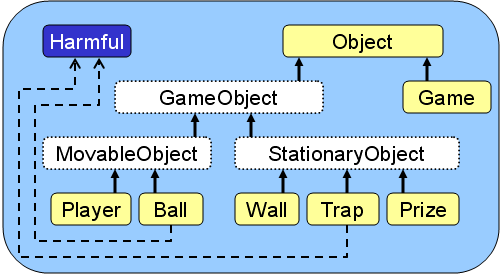
- Now we will add functionality to allow game objects (i.e., Ball and Trap) to be harmful to the players
of the game. We will do this by making use of a JAVA
interface definition called Harmful.
This
interface
will be implemented by all objects that are harmful
to the players. That means, we will be able to ask an object how
harmful it actually is by asking for its damage amount so that we can
update our score.
- Create an interface called Harmful by
writing the following code in in a file called Harmful.java,
and the compile it:
interface Harmful {
public int getDamageAmount();
}
- Add a minor change to the Ball and Trap class
definitions so that they both implement this interface. Once you
do this, these two classes will not compile. That's because
in order to "implement an interface", a class must have
code for the methods in that interface. The Ball and Trap classes
are now forced to write a method called getDamageAmount() and your code
will not compile until you do so. Write this method in the Ball class
so that balls cause a -200
damage amount (i.e., return -200 when asked for the damage amount) and
in the Trap class
so
that
traps
have only a -50 damage
amount. As we did with the toString()
method, we must put the word public before the method's return
type, since interfaces require us to write publicly accessible
methods (we'll discuss this later in the course).
- Write the following method in the Game class
which
returns an array
of all objects that implement the Harmful interface:
Harmful[] harmfulObjects() {
int
harmfulCount = 0;
// Count harmful objects
for (GameObject g: this.gameObjects)
if (g instanceof Harmful)
harmfulCount++;
// Now gather them together
Harmful[] badGuys = new Harmful[harmfulCount];
harmfulCount = 0;
for (GameObject g: this.gameObjects)
if (g instanceof Harmful)
badGuys[harmfulCount++] = (Harmful)g;
return badGuys;
}
Examine the code to make sure that
you understand it. The one aspect of the code that should
be new to you is the
type-casting of g to (Harmful)
when we add it to the badGuys list.
This
is
necessary in order for the compiler to allow you to put general
GameObjects into a list that
expects only Harmful objects.
What
we
are trying to do is valid because we just checked (by means of
the instanceof) that the
object was indeed Harmful ...
but the compiler does not realize that we did this "check" on the
previous line. Compile the code.
- Add the following to the end of
your GameTestProgram
class
and compile/run it:
// Get the
harmful objects
System.out.println("\nHere are the Harmful Objects:");
Harmful[]
harmfulOnes = g.harmfulObjects();
for (int i=0; i<harmfulOnes.length;
i++)
System.out.println(harmfulOnes[i];
You should see the following,
showing 2 Trap objects and 1 Ball object:
Here are the Harmful Objects:
Trap at java.awt.Point[x=125,y=35]
Trap at java.awt.Point[x=145,y=145]
Ball at java.awt.Point[x=155,y=100] facing 0 degrees going 0 pixels per
second
- Now that we have the harmful
objects, we can search through them and
ask each one of them what damage amount they have. Write
a
method
in the Game class
called
assessDanger() that
uses the harmfulObjects()
method that you just wrote and returns the integer total sum of damage
amounts for all the harmful objects. When you write the
code that iterates through the harmful objects, you should notice that you
do
not
need
to know what kind of actual object it is (i.e., Trap or Ball).
Instead, you just need to call the getDamageAmount()
method for the object.
Interestingly, you will notice as
well that we did not create a damageAmount
attribute for
these Harmful objects.
We
could
not create such a shared
attribute without altering the class hierarchy. Why ?
Ask the TA if you do not know. Of course, by having the getDamageAmount() method
which
returns an appropriate value, we kind of "fake" having such an
attribute.
Add the following to the end of
your GameTestProgram
class
and compile/run it:
// Assess the current amount of danger
System.out.println("\nCurrent Danger Assessment:");
System.out.println(g.assessDanger());
You should see a value of -300 (from
the one ball and two traps in the game).
- Look through the
toString() methods in the classes and make use of inheritance by
eliminating duplicate code. You should notice that all GameObjects have
a
similar
portion of their toString() method
in
common (i.e., they all display their class
name and location) and
that all MovableObjects
also
have toString() code in
common that shows the direction that
they
are
facing as well as their speed.
- Using a 2D array, create
a GameBoard class
that
will
display a game board on the System console
showing the walls, as well as the locations of the
players, ball, traps and prizes. It is up to you how to display
it. However, here is one possible way to display the game
as a 20x15 grid:
|
####################
#
$
#
# v
@
#
#
#
# ###########
#
#
##### $
#
# #
#
# # > #
# #
#
# # @ #
# o
#
# ^
$
#
#
#
####################
|
|
You
may
notice
that the players show their direction as '<', '>', '^'
or 'v'. You can
choose any representation that you want.
You should add an attribute to the Game class
to maintain this gameBoard.
The
GameBoard should maintain an
attribute called grid which
will be a Character[][] object that will
contain all the characters shown on the gameboard. You will likely
want to define the following abstract
method in the GameObject class
so
that
each type of GameObject
is
forced
to define the way that they look on the gameBoard by returning a character
representation of themselves:
abstract char appearance();
You may want to add a display(GameObject[]
objects)
method in the GameBoard class
that
will
draw the GameBoard
on
the screen according to the objects in the game that are passed in as a
parameter. You should comment out the code in draw() methods for MovableObjects (or removing the drawing behavior
altogether) since
the GameBoard will
draw
them.
Likely, you will also want to add this displayBoard() method in the Game class
to display the gameBoard:
void displayBoard() {
this.gameBoard.display(this.gameObjects);
}
Note: There are some tricky aspects regarding MovableObjects:
- The math for moving the player assumes origin (0,0) at the bottom left, but in
computer science ... as with the Point class ... (0,0) is at the top left. So,
you will need to either reverse the y value before displaying (i.e., y = MaxGameBoardHeight - y) or reverse the y in the math code for moving the MovableObjects forward.
- Don't worry about collisions. But you will need
to make sure that the
objects don't go beyond the borders.
- You will need to erase the old location of the balls and
players by placing a "space" there after the object moves.
To do this, you will need to keep the previousLocation
for a MovableObject and
update
it
each time the object moves so that you can make use of it
during display.
Test your code by using this
GameBoardTestProgram
with this code:
import java.awt.Point;
import java.awt.Color;
class GameBoardTestProgram {
public static void
main(String args[]) {
Game g = new Game();
// Add some walls
g.add(new Wall(new Point(0,0), 20, 1));
g.add(new Wall(new Point(0,0), 1, 15));
g.add(new Wall(new Point(19,0), 1, 15));
g.add(new Wall(new Point(0,14), 20, 1));
g.add(new Wall(new Point(1,6), 4, 1));
g.add(new Wall(new Point(9,4), 10, 1));
g.add(new Wall(new Point(12,7), 1, 4));
// Add some prizes
g.add(new Prize(new Point(17,1), 1000));
g.add(new Prize(new Point(6,6), 500));
g.add(new Prize(new Point(15,12), 750));
// Add some traps
g.add(new Trap(new Point(13,2)));
g.add(new Trap(new Point(15,10)));
// Add a Player
Player player = new Player("Red Guy", Color.red, new Point(3, 12), 0);
player.speed = 1;
player.direction = 90;
g.add(player);
// Add a Ball
Ball ball = new Ball(new Point(3, 11));
ball.speed = 5;
ball.direction = 0;
g.add(ball);
// Make some updates, displaying the
board each time ...
for (int i=0; i<15; i++) {
g.updateObjects();
g.displayBoard();
System.out.println("--------------------");
}
}
}