|
COMP1406 - Tutorial
#8
ArrayLists, Subclasses and Interfaces
 |
 |
Purpose:
The purpose of this tutorial is to give you practice using generic ArrayList objects and creating user-defined types with subclassing and interfaces. The generic ArrayList container is particularly useful for grouping objects the are not of the exact same type. Generic means we are using the programming syntax ArrayList<Person> people = new ArrayList<Person>();. That is, the <Person> syntax is used to specify that generic code should be compiled for the specific type Person. This tutorial consists of two problems designed to illustrate the use of generic ArrayList objects and in particular the relationship between these generic containers and subclasses and interfaces (extends and implements). This tutorial is based on Chapter 3 and section 7.2 of the course notes.
Problem 1
ArrayLists and Subclasses
The purpose of this problem exercise is to
show you decoupled code that uses a generic
ArrayList, a new style of for-loops, and uses inheritance. This
is based on section 7.2 of the course notes. In this exercise you will
get practice building your own subclasses and adding them to an
existing ArrayList of similar, but not
exactly the same kind, of objects.
Problem
Description
We have provided a Tester.java class
to run the program, a
PeopleFactory class to create some people, and some kinds
of people: Person, Student, and Professor. All These classes
are complete except the Tester. It has some missing code. Open this
code, examine it, and run it. First we want you to get the tester to
run (problem 1A) then we want you to add two new subclasses: TA and Staff. (problem
1B)
Problem 1A -Looping Through
the ArrayList
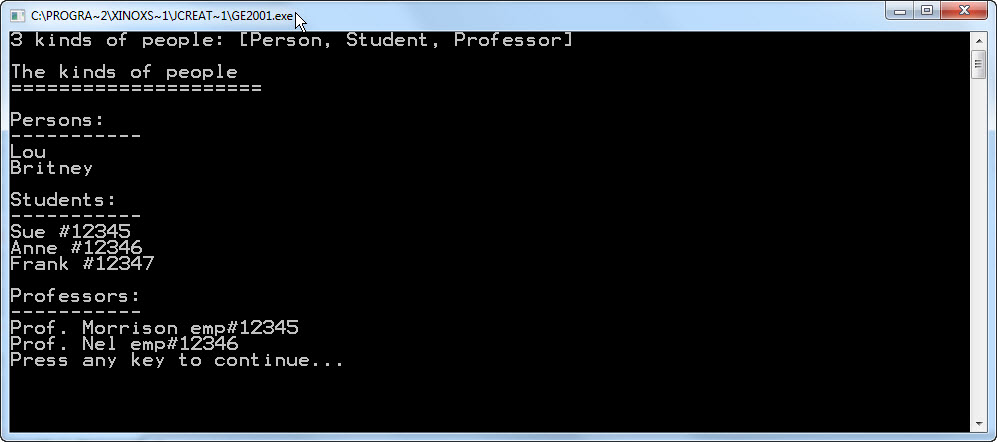
Complete the class Tester by adding the //MISSING CODE so that the program produces output like that below. To do this you must initialize the ArrayList<Person> people; and then loop through it using a for(Person aPerson: people){} style of for loop. The goal here is to produce the the sample output shown without hard-coding the names of classes. That is, don't refer to "Student" instead simply ask an object of it's classes name like this: String className = anObject.getClass().getName();. The goal is to write your code to it will work even if new classes are added, as we will do in problem 1B.
Problem 1B -Additional
Kinds of People
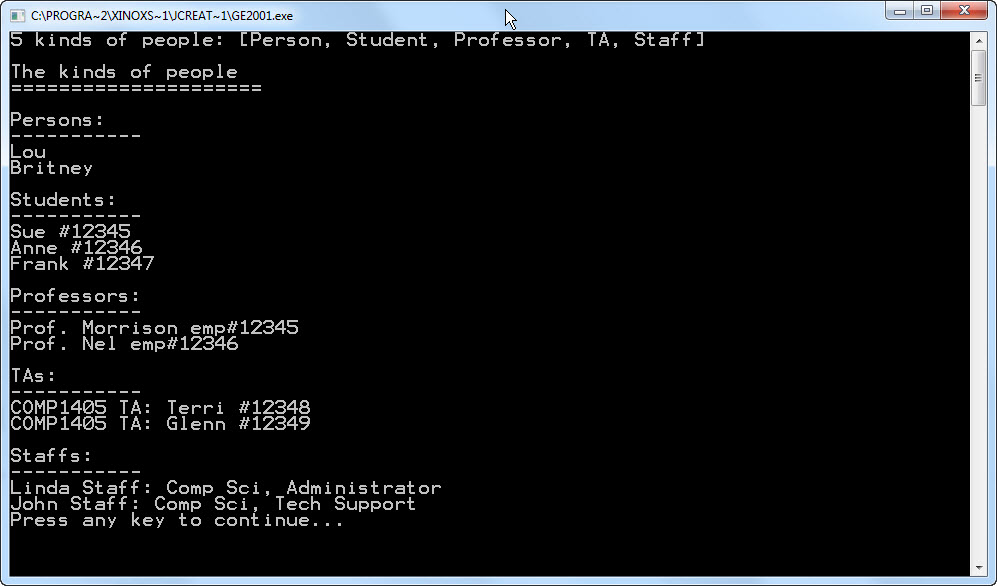
Next we want you to add additional classes so that you can un-comment the lines of code in the PeopleFactory class that creates both TA objects and Staff objects and so that the output is like the sample shown below.
You will have to do the following:
Create a class TA that extends class
Student.
Create a class Staff that extends class Person.
After you have created these
classes you should be able to un-comment the lines of code in the PeopleFactory class that creates some of
these new kinds of people. What is important to notice
here is that your new kinds of objects can be added to an existing ArrayList<Person> because your new
objects inherit from class Person.
Specific Requirements
Complete the class TA
so that you can un-comment the lines of code in the PeopleFactory class that creates TA objects
and so that the output is like the sample shown in the Tester .
You will have to do the following:
-Create a class TA that extends class
Student.
-Add a variable to the TA class
to represent the course the student is TA'ing.
-Provide a constructor for the class so the code in the PeopleFactory will work as provided.
-Provide a toString() method for the TA class
so that TA's will output as shown in the sample code.
Complete the class Staff so that you can un-comment the lines of code in the PeopleFactory class that creates Staff objects and so
the output is like the sample shown in the Tester.
You will have to do the following:
-Create a class Staff that extends class Person.
-Add variables to the Staff
class to represent the department and position of
the staff member.
-Provide a constructor for the class so the code in the PeopleFactory will work as provided.
-Provide a toString() method for the Staff class so that Staff objects will
output as shown in the sample code.
Problem 2
ArrayLists and Interfaces
The purpose of this problem exercise is to
demonstrate how objects can masquerade as many different types by implementing the
appropriate interface.
The demonstration program provides three
"service provider" classes. One is a PrintingService and expects to
deal with Printable
objects. Printable objects
are those that implement the
Printable interface. The
second is a BankingService
which expects to deal with
MoneyAccount objects.
MoneyAccount objects are those that implement the MoneyAccount interface. The
last is a SortingService
that is willing to sort
an ArrayList<Sortable>
of Sortable objects. Sortable objects are those
that implement the Sortable
interface.
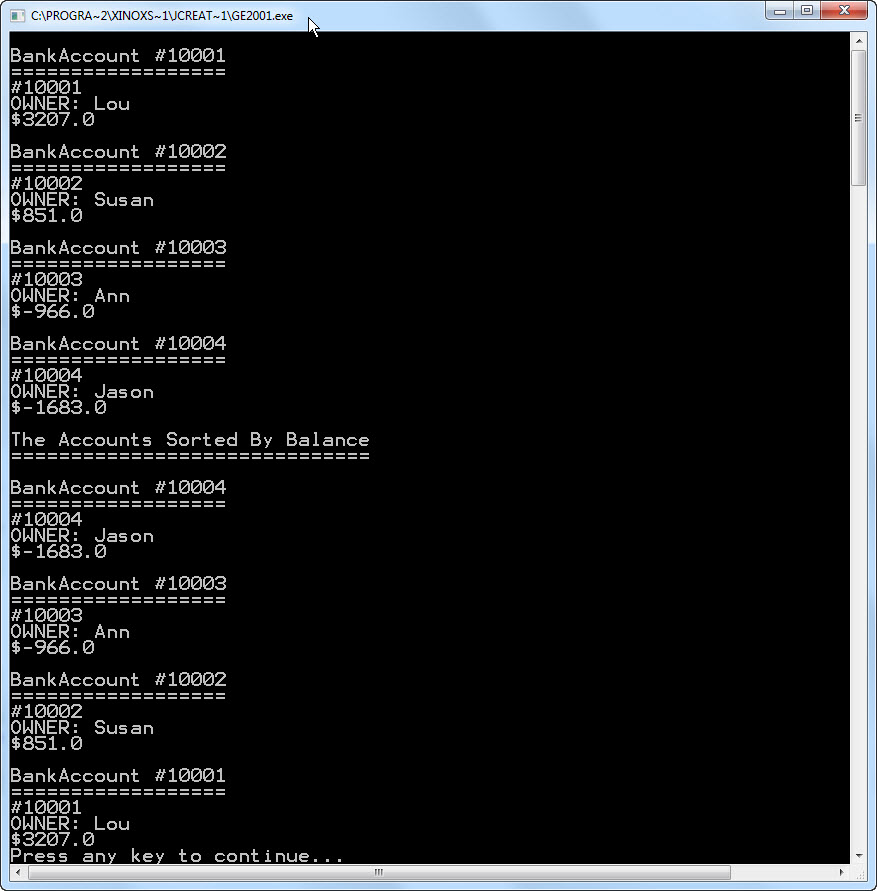
In this exercise we want to have some BankAccount objects make use
of these services. Therefore it must be possible to pass the BankAccount objects to code
that is expecting either a
Printable, a MoneyAccount,
or a Sortable. This can
be done by having the BankAccount
class implement those protocols, or interfaces.
Study the main program in class Tester and the other classes
provided. The main program will not initially compile because the
required interfaces have not yet been implemented. You need to
implement the three interfaces in class BankAccount so that the main
program compiles, runs and produces output similar to that shown. All
the code you need to add goes in class BankAccount, the other classes
are all complete. Start by commenting out most of the main program and
then uncomment the parts as you get them built. The specific
requirements below suggest a step-wise approach.
Specific Requirements
Change the BankAccount class signature so that it implements the
MoneyAccount interface as follows.
public class BankAccount
implements MoneyAccount {...}
Step 1b)
Implement the MoneyAccount
interface methods in class
BankAccount based on the comments provided in interface MoneyAccount.
Step 2a)
Change the BankAccount class signature so that it also implements the Printable interface as follows.
public class BankAccount implements MoneyAccount, Printable {...}
Step 2b)
Implement the Printable
interface methods in class BankAccount based on the comments provided
in interface Printable.
(See the sample output of the main program to see how the printed
accounts look.)
Step 3a)
Change the BankAccount class signature so that it also implements the
Sortable interface as follows.
public class BankAccount
implements MoneyAccount, Printable, Sortable {...}
Step 3b)
Implement the Sortable
interface methods in class BankAccount based on the comments provided
in interface Sortable.
The accounts should base their sorting order on the account balance. Notice in the main
program that this is trickier because we have to create a collection of
Sortables to sort and then cast each Sortable to a Printable to print
it. (This is done for you, we are just pointing it out.)
Sample Output: