|
COMP1406 - Tutorial
#9
Recursion  |
 |
Purpose:
The purpose of this tutorial is to give you practice
using recursion. This tutorial is based on the recursive maze search
described in section 8.2 of the course notes. Here, however we will use
a graphical version of the maze in which the cells are represented by JButton objects. The graphical part of
the code is already complete you will only need to work with the
recursive search part of the problem. What makes this
tutorial challenging is that there is way too much code to examine all
of it, and also you need to understand how to solve problems using
recursion to complete this tutorial. You will not be able to read and
understand all the code provided in the time allocated for the tutorial
-you need to focus on those parts that are relevant to the task.
Demonstration:
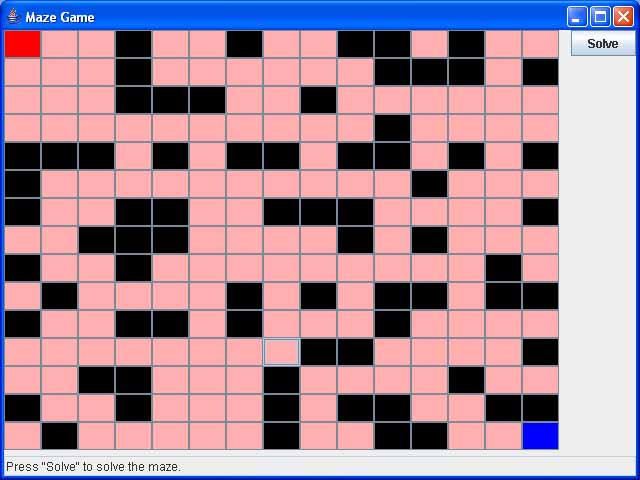
Open the java file Demo1/MazeGame.java within JCreator and briefly examine the code (you don't need to understand it all). Compile the program and run it. The demonstration program produces a maze that consists of cells. (The cells are actually represented by JButton objects but that is not really relevant to our task.) The black cells are walls and the pink cells are cells you can travel along. The red cell in the upper left is the starting location and the blue cell in the lower right is the finish location. Each time the game opens the maze looks different, however you can toggle cells between being walls, or not, by clicking on them with your mouse. Go ahead and try it.
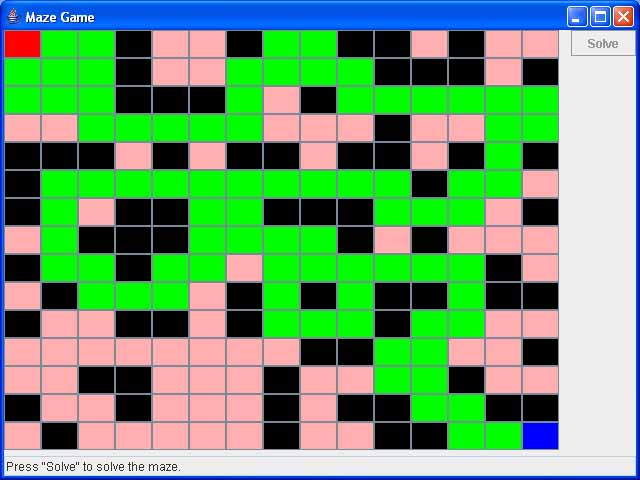
The game has a solve button. When the solve button is pressed a path from the start cell to the finish cell must be found, if one exists, and shown in green. If no path is possible nothing gets shown. The path does not have to be a shortest path, just any set of adjacent cells that connects the start to the finish. The screen capture below shows a possible path through the maze. Again, notice this path is in no way optimal.
Currently when the
Solve button is pressed it invokes a solve() method in the Maze class. The solve() method in turn invokes
the findPathFrom(Cell aCell)
method. This is the method you need to write. It needs to recursively
find a path from aCell to
the finish location. The
comments in this recursive method explains the strategy for how to
solve the problem. You will not need to modify any of the other code.
In fact, the only code you will need to even look at is the Maze class and the Cell class. Of course you can
explore the rest of the code to see how it works if you want.
Here are some specific suggestions for writing the findPathFrom(Cell aCell) method.
Specific Requirements and Suggestions
Look at the comments in the Maze class's findPathFrom(Cell aCell)
method. They explain the recursion strategy for solving the problem and
show where the missing code goes.
The basic strategy is as follows. Start at the starting cell and mark
it as visited, then find any of its neighbouring cells that have not
yet been visited. If a path can be found from that neighbour to the
finish set the neighbour to be in the route and return true (meaning we found a path). Otherwise
try again from one of the other unvisited neighbours. If no path from
any of these neighbours can be found, then none exists and you should
return false.
Remember, when doing recursion a method must
call itself, but on a smaller problem, and this will continue until a
basis case problem is encountered. In this exercise the problem gets
smaller by marking cells as "visited". So the number of unvisited cells
really defines the current size of the sub-problem.
The Cell class provides a method setInRoute() which should be called if you want a cell to be in the path. This will automatically cause that cell to be drawn in green when the window is redrawn.
The Cell
class provides a method
getAnUnvisitedNeighbour() that will return, for any cell, an
adjacent neighbour that has not yet been visited.
(Advanced Optional Part)
A Better Mousetrap
Here are some improvement you can try and make if you have time.
1) Have the start and finish locations be user selectable
2) Optimize the path. That is try and find a path that does not have wasted travel in it. Here are two suggestions: you could find a path and then try to improve that path by removing waste, or alternatively, try to find a path that does not have wasted travel in it.