Note: Submit your written work in a single .txt or .pdf file. Your work will not be graded if it is not submitted in one of these two formats.
Consider the following code fragment:
int q = 0;
for(int i=0; i<7; i+=2){
   q = q + i;
}
text(q, 10, 10);
What value is displayed on the screen?
(That is, what is the value of q at the end of the code fragment?)
Write a function that converts Celsius to Fahrenheit.
The function should input a float (the temperature in Celsius)
and output a float (the temperature in Fahrenheit).
Write out pseudocode for a function called "NAND" that has two inputs, both booleans, and returns a boolean that is the logical equivalent of negating the AND of the two inputs. Do not use the logical AND (&&) operator, the logical OR (||) operator, or the logical negation/not (!) operator in your code. Instead, write out if statements that cover the possibilities.
Note: pseudocode is a way of describing algorithms that is somewhere between plain language and actual code. (It is not code.) For example, you can use basic coding language constructs such as if and while, for and return as most programming languages have these. You should not use language specific code though. Someone reading your pseudocode should be able to easily implement the algorithm in whatever coding language they are most comfortable with.
Note: For each question, add the processing folder with your sketch to your ZIP file, not just your sketch (.pde file). Label each folder/sketch as Question4, Question5, etc. Do not put a space between "Question" and the number.
Note: For all of your sketches, the output window should have width and height at least 300 (but do not make them extremely large).
Note: For this and the remaining assignments, it is expected that you
WILL use setup() and draw()
unless specifically asked not to.
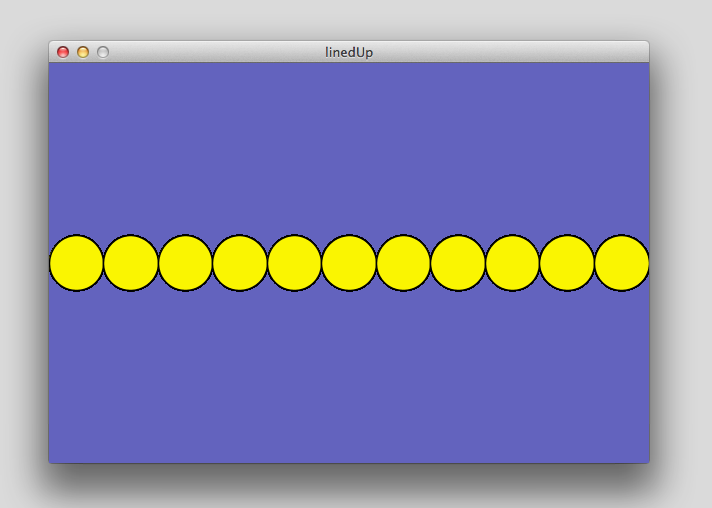
Draw 11 circles on the screen so that they are lined up horizontally and they occupy the entire width of the screen. Don't let the circles overlap and make sure all circles fit on the screen. Your output should look something like this picture.
Hint: Use a for loop.
Note: This should work no matter what you set the size of the output window to be. (Do not hard-code the size of your output window in your calculations!)
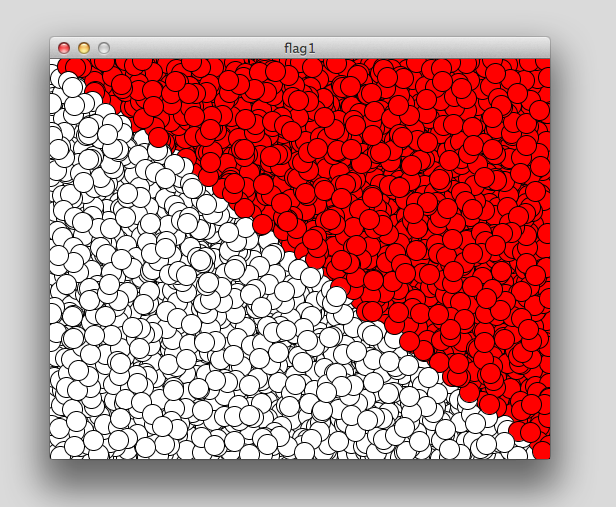
Write a sketch that repeatedly draws circles at random locations in the output window. Each circle should be filled either white or red so that the after many circles are drawn your output looks similar to this picture. That is, all circles below the main diagonal should be white and all circles above the diagonal should be red. You should see the circles appearing one at a time as the picture is drawn.
Write a function called getColor() that inputs two integers (x and y positions) and outputs the color that a circle should be drawn at that position.
Use this function to determine the colour of each circle you draw.
Thus, your draw() loop should look something like
void draw(){
   x = (int) random(width);
   y = (int) random(height);
   fill( getColor(x,y) );
   ellipse(x,y,20,20);
}
Write a sketch that draws a circle in the centre of the output window with radius equal to the current distance from the centre of the screen to the current mouse position. The circle should adjust itself as you move the mouse around the screen.
Repeat Problem 6, but this time whenever you click the mouse, your program should remember the current circle. In frames afterwards, it should draw this remembered circle (now with a different border color) and the current circle defined by the mouse position. Each time you click the mouse, it forgets the last remembered circle and remembers the current circle.
Note: Draw your circles so that they are transparent. That is, you should only see the border of the circles. (And you should always see both circles when two should be visible.)
Write a function that draws a bird at a certain location on the screen. (Your function takes the x and y coordinates as input parameters.)
Use this function to draw a flock of birds. Your flock should have between 10 and 20 birds in it (to be determined randomly each time you run the sketch).
Do not use the noLoop() function in your sketch.
Write a sketch with 3 rectangles at the top of your screen with the words "colour", "size" and "restart" written inside them (one word for each rectangle).
You sketch should continually draw random circles on the screen (outside of these rectangles).
The three rectangles at the top of the screen should span the entire width of the screen (not overlapping) and take up no more than 25% of the height of the screen. Essentially, you are simulating "buttons" for your sketch.
Write a boolean function that tests if an input integer is a prime number or not. (A boolean function is a function that returns a boolean.) A prime number is a number that is evenly divisible by 1 and itself and no other numbers. So, 2,3,5,7 are prime numbers but 10 is not prime (because 2 divides 10, and 5 divides 10). Your function should have one input parameter (an integer).
In your sketch, whenever the mouse is pressed, you will call this function and check if the number given by (mouseX*mouseY) + mouseY is prime or not. You should display in the output window a message such as "the number 176 is not prime" or "the number 101 is indeed a prime". This message should stay on the window until you press the mouse again and repeat this process with the new mouse coordinates.