Given two functions
void   foo(String s){...};
String bar(int i, float f){...};
What is the return type and input types of
function mystery such that
the following statement is valid in Processing?
foo( mystery( bar(12, 3.14159), 12.1 >= sqrt(112), 3+4 ) );Write your answer in the same format as the functions
foo and bar are given above.
(You do not need to write extra "words" in your solution.)
You want to make a card game. Describe how you would
"shuffle" the deck of cards. Make sure you list
any variables/data structures you need for this.
You can use the random() function to help.
Consider the function
int foo(int a, int b){

   int sum = 0;            // initialize

   while ( a < 100 ){      // loop
      sum = sum + a - 2*b;
      a = 2*a;
      b = b/2;
   }

   return sum;             // return
}
Trace the code when the function is called as foo(3,49). That is, write out a table showing the values of all
the variables in the function as the function executes. Show
all the values for each iteration of the loop.
For example, a trace for foo(40,16) would
look like
                sum     a    b
=================================
initialize        0    40    16

loop              8    80     8
                 72   120     4

---------------------------------
return           72   120     4
=================================
Note: For each question, add the processing folder with your sketch to your ZIP file, not just your sketch (.pde file). Label each folder/sketch as Question4, Question5, etc. Do not put a space between "Question" and the number.
Note: For all of your sketches, the output window should have width and height at least 300 (but do not make them extremely large).
Note: For this and the remaining assignments, it is expected that you
WILL use setup() and draw()
unless specifically asked not to.
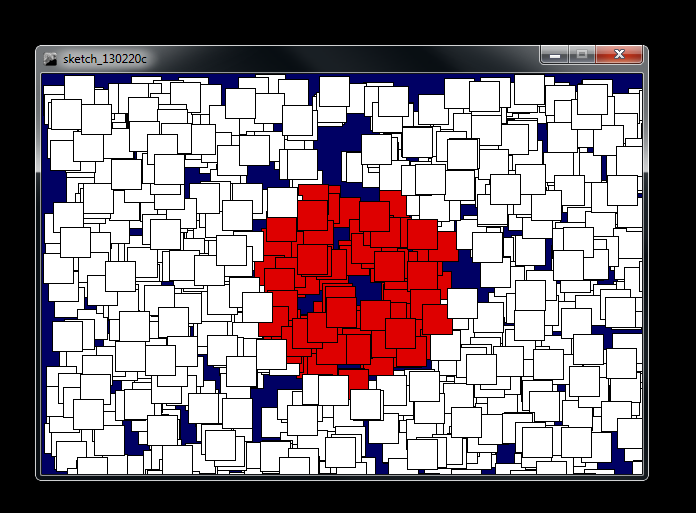
Write a sketch that repeatedly draws squares at random locations in the output window with different colours so that, after many squares are drawn, your output looks similar to this picture. (A red circle centred on a white background.)
To solve this problem, write a function called
getColor() that
inputs two decimal numbers (float type),
which are x and y coordinates, and outputs the color that a
square should be drawn at that position.
Use this function to determine the colour of each square
you draw.
Your draw() loop should look exactly like
void draw(){
   x = random(width);
   y = random(height);
   fill( getColor(x,y) );
   rect(x,y,30,30);
}
Using a variable called num (an integer),
draw num rectangles on the screen so that
they are nicely lined up horizontally and not overlapping.
All the rectangles should initially be the same colour.
As time progresses (as we iterate through the draw() function), each rectangle should change from the initial colour to a second colour, then to a third colour, and then back to the original, at which point it repeats the changes. Pick appropriate colours. Each box uses the same sequence of colours.
The frequency in which each rectangle changes its colour should be randomly chosen. Use an appropriate range (the colours should not change so fast so that the rectangle seems to just flicker with colours and it should not be too slow that a marker stops looking at your code and decides it is not changing at all).
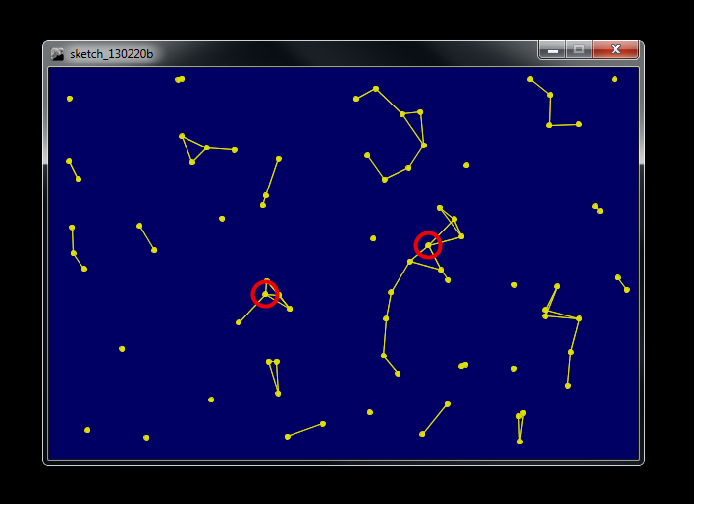
Draw a bunch of stars randomly on the screen. Draw a line connecting each pair of close stars.
Let the degree of a star be the number of close stars to it (it is also the number of lines going from it to another star). Find the largest degree of all stars and draw a circle around all stars with that maximal degree (there might be several).
Your output might look something like this picture.
Note: For this question, a "bunch" means at least 50 and "close" means about 1/10 of the min(width,height).
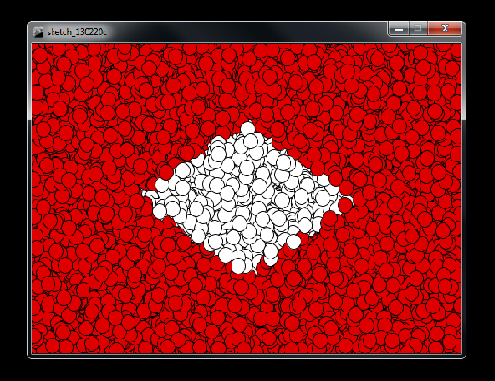
Repeat Problem 4, but have your output look like this picture. You can draw circles or squares.
Using a variable called num (an integer),
draw num circles on the screen so that they are
not overlapping. All the circles should be the same
colour.
When you click the mouse button on a circle the colour of that circle should change and the mouse should then take control of the position of that circle. As you move the mouse, the circle Will move with it. The circle will move with the mouse until you click the mouse button again, freeing that circle. When a circle is freed, its location becomes fixed again and its colour returns to the original colour (same as the others).
You should be able to keep taking control of circles, potentially moving them around, freeing them and then taking control of other circles.
You can assume that the user will not move the mouse extremely fast.
Bonus:
Repeat the rectangular spiral question from Assignment #2.
However, this time use the draw() function
to show it being constructed.
Each frame (iteration of the draw() function)
should only draw a little bit of the spiral though.
Do not draw entire sides of the spial at one time.
It doesn't matter how you go about constructing it as
long as it gets fully constructed
at the end.
No Question 10 this time. Instead, we'll have an optional bonus question.
Bonus Problem: Make a sketch that does the top part (circle/sine wave) of this animation.