| 95.105/145 - Introduction to Programming |
Fall 2001
|
12 Java2 Collections |
| 12.1 Collection Organization |

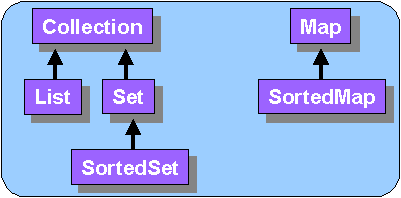
In this set of notes, we investigate these new java collections. There are many types of collections and at first, their organization appears a little confusing. Collections are organized into a hierarchy of Interfaces, rooting at either Collection or Map:
Recall that an interface specifies a list of method signatures...not any code. Also recall that interfaces can be arranged in a hierarchy just like classes so that interfaces can inherit from each other (e.g., SortedSets inherit from Sets and Collecions).
All collections store objects called their elements. Note that data types cannot be stored in any kind of collection directly (we can use wrapper classes though). The collections themselves allow heterogeneous objects to be stored. That is, the elements in any one collection may be any kind of object and we can mix different kinds of objects within the same collection. Storing mixed kinds of objects in a Collection is allowed, but not often done unless there is something in common with the objects (i.e., Abstract class or Interface). Also, we will need to type-cast the value when we take it out of the collection so we need to know what kind of object is in there !
These interface definitions represent a general "type" of collection. The collections all differ with respect to:
Some collections allow duplicate elements (e.g., lists), while others do not allow duplicates (e.g., sets). Some collections are ordered (e.g., lists), while some others are not ordered (e.g., sets and maps). So you can see that there is a certain degree of specialty for each type of collection. We need to understand what the characteristics of a collection are so as to be able to choose the right one for our application. Try thinking about issues such as order and duplication for applications that involve:

Unlike Arrays, all Java2 collections (in general) are growable. We will not discuss arrays any further in this set of notes as they are very special kinds of collections that actually have quite special behaviour.
| 12.2 The Collection Interface and its Class Hierarchy |
Querying methods (returns some kind of value):
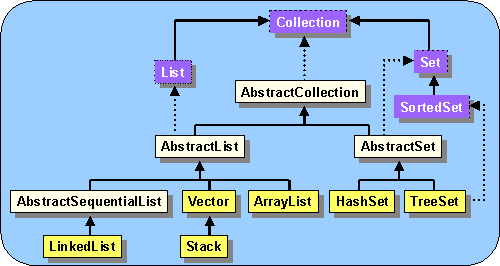
Notice that there are 4 abstract classes and 6 concrete classes shown. There are actually a few more which you can take a peak at in the Java documentation. Examining the diagram, we notice a few things of interest:
| 12.3 The List Classes |
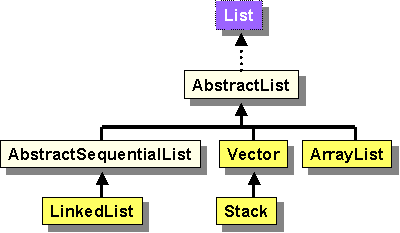
The List classes:
There are 4 main List implementations:
Vector
|
 |
ArrayList
|
 |
LinkedList
|
 |
Stack
|
 |
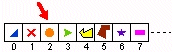
Vectors/ArrayLists are perhaps the most-used collection class. They are simple and intuitive to use.
Here are two ways of making one and storing it in a variable:
Vector aVector = new Vector();Once created, you can then apply any of the standard collection methods (plus others):
Vector aVector = new Vector(Collection col);ArrayList anArrayList = new ArrayList();
ArrayList anArrayList = new ArrayList(Collection col);
| Vector myList = new Vector();
myList.add(“Hello”); myList.add(new Date()); myList.add(new BankAccount()); System.out.println(myList.size()); |
ArrayList myList = new ArrayList();
myList.add(“Hello”); myList.add(new Date()); myList.add(new BankAccount()); System.out.println(myList.size()); |
Notice that the Vector and ArrayList are used the same way once created !!! If you do not care about synchronization, use ArrayList instead of Vector.
When extracting elements from a Vector or an ArrayList (or in fact ANY collection at all), the element is returned as type Object.
String[] names = {“Al”, “Zack”, “Sally”, “Mel”};To get the Customers back out later, we must type-cast the result of the get(int index) method:
Vector v = new Vector(); //can use ArrayList v = new ArrayList(); instead
for(int i=0; i<names.length; i++) {
Customer c = new Customer();
c.setName(names[i]);
v.add(c);
}
for (int i=0; i<v.size();i++) {
Customer c = (Customer)v.get(i);
System.out.println(c.getName());
}
A Linked List is very basic and general data structure. It is actually used as a low-level data structure for implementing more complex data types such as stacks, queues, deques, trees, etc... You will learn much more about linked lists in your 2nd year data structures course.
Linked lists allow direct operations to the front and the back of the list. Such operations to the front and back of the list are typically quick whereas operations to access or modify an inner element of the list are typically very slow, requiring a linear search:
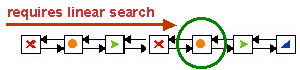
The elements of the list are still kept in order and so operations such as adding and removing from any position in the list is possible. These operations are slower though. It is more efficient to use these methods instead:
addFirst(Object obj) - add the given object to the front of the listFor a more complete list of methods, see the Java2 API specification.
addLast(Object obj) - add the given object to the end of the list
removeFirst() - remove and return the first object from the list
removeLast() - remove and return the last object from the list
getFirst() - return the first object in the list
getLast() - return the last object in the list
We all know that a stack is a collection of items that are placed or
"stacked" on top of one another. The very definition of a stack implies
a last-in-first-out protocol
when accessing the items. That is, when placing items in the
stack, we put them at the top and when removing them, we always take the
top one off.
What do we use a stack for ?
Stack myStack = new Stack();Although Stack inherits many other methods from its superclasses, here are the standard Stack methods:
Here is an example that determines if the brackets match in a given
mathematical expression which is stored as a String. When encountering
an openning bracket
we'll increment a counter. When encountering a closing bracket,
we'll decrement the counter.
"((23 + 4 * 5) - 34) + (34 - 5))" //does
not match since there is one extra bracket
"((23 + 4 * 5) - 34) + ((34 - 5)" //does
not match since there is too may opening brackets.
import java.util.Stack;
public class Brackets {
public static boolean bracketsMatch(String aString) {
Stack aStack = new Stack();//Go through the characters of the String and look for brackets
for (int i=0; i<aString.length(); i++) {
char aCharacter = aString.charAt(i);
if (aCharacter == '(') {
//We must convert the char data type to an Object (wrapper)
aStack.push(new Character(aCharacter));
}
else
if (aCharacter == ')') {
if (aStack.empty())
return(false);
else
aStack.pop();
}
}
//Now check if there are open brackets still in the stack
return aStack.empty();
}public static void main(String args[]) {
String aString;
do {
System.out.println("Please enter the expression: (just <cr> to quit)");
aString = KeyboardPrompter.getString();//Now do the bracket matching
if (bracketsMatch(aString))
System.out.println("The brackets match");
else
System.out.println("The brackets do not match");
} while (aString.length() > 0);
}
}
Here are the testing results:
| Please enter the expression: (just <cr>
to quit)
(1 + 3) The brackets match Please enter the expression: (just <cr> to quit) (1+(2+(3))) + (4+(5+(6))) The brackets match Please enter the expression: (just <cr> to quit) ( The brackets do not match Please enter the expression: (just <cr> to quit) ) The brackets do not match Please enter the expression: (just <cr> to quit) () The brackets match Please enter the expression: (just <cr> to quit) )( The brackets do not match Please enter the expression: (just <cr> to quit) Hello The brackets match Please enter the expression: (just <cr> to quit) The brackets match |
Example
The example above is not very difficult, but what if we have 3 kinds
of brackets (, [, and { ? Maybe we can keep 3 counters
? Nope. We need to know the
order that the openning brackets are encountered. We'll
use a Stack to maintain this order. When encountering an openning
bracket we'll place it on the stack.
When encountering a closing bracket, we'll pop an openning bracket
off the stack.
"[(23 + 4 * 5) - 34} + {34 - 5})" //does not
match since there is one extra bracket
"[{23 + 4 * 5} - 34] + [(34 - 5)" //does not
match since there is too may opening brackets.
Here is the code:
public static boolean bracketsMatch(String aString) {Here are the testing results:
Stack aStack = new Stack();
char aCharacter;//Go through the characters of the String and look for brackets
for (int i=0; i<aString.length(); i++) {
aCharacter = aString.charAt(i);
switch(aCharacter) {
case '(':
case '[':
case '{': aStack.push(new Character(aCharacter));
break;
case ')': if ((aStack.empty()) || (((Character)aStack.pop()).charValue() != '('))
return(false); break;
case ']': if ((aStack.empty()) || (((Character)aStack.pop()).charValue() != '['))
return(false); break;
case '}': if ((aStack.empty()) || (((Character)aStack.pop()).charValue() != '{'))
return(false); break;
}
}
//Now check if there are open brackets still in the stack
return (aStack.empty());
}
| Please enter the expression: (just
<cr> to quit)
](){}[ The brackets do not match Please enter the expression: (just <cr> to quit) ()[]{} The brackets match Please enter the expression: (just <cr> to quit) {{(([[]]))}} The brackets match Please enter the expression: (just <cr> to quit) {{{{{{ The brackets do not match Please enter the expression: (just <cr> to quit) }}}}}} The brackets do not match Please enter the expression: (just <cr> to quit) ((()[]{})[()[]{]) The brackets do not match Please enter the expression: (just <cr> to quit) The brackets match |
| 12.4 The Set Classes |
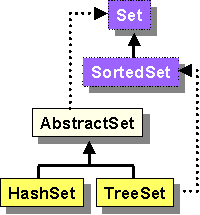
The Set classes are much like Lists, except that they do not allow duplicates.
HashSet
|
 |
TreeSet
|
 |
Consider this code that adds some BankAccounts to an ArrayList:
String[] names = {"Al", "Zack", "Sally", "Al", "Mel", "Zack", "Zack", "Sally"};Here is the output, as expected:
ArrayList aCollection = new ArrayList();// Fill up the collection
for(int i=0; i<names.length; i++)
aCollection.add(names[i]);// Now print out the elements
for(int i=0; i<aCollection.size(); i++) {
System.out.println(aCollection.get(i));
}
| Al
Zack Sally Al Mel Zack Zack Sally |
Can we simply replace the collection type to be HashSet and run this code ? Well all the code works except for the call to get(i) in the second for loop. Why ? Because sets are non-indexable, so we cannot ask for particular elements from the set. Instead, we must call the iterator() method for Sets that returns an iterator which we can then use to traverse through the elements:
String[] names = {"Al", "Zack", "Sally", "Al", "Mel", "Zack", "Zack", "Sally"};Here is the output:
HashSet aCollection = new HashSet();// Fill up the collection
for(int i=0; i<names.length; i++)
aCollection.add(names[i]);// Now print out the elements
Iterator it = aCollection.iterator();
while (it.hasNext()) {
Object anElement = it.next();
System.out.println(anElement);
}
| Sally
Zack Mel Al |
Now we only get the unique names coming out on the console window...so
there are no duplicates :).
But hold on! This is not the order that we added the names
into the collection!! Well...recall that the elements are not
kept in any kind of order, and in fact, Java has its own pre-determined
order based on hashcode values of the elements in which we added.
What about a TreeSet ? Shouldn't that keep an order
? Let's see:
String[] names = {"Al", "Zack", "Sally", "Al", "Mel", "Zack", "Zack", "Sally"};Now we get this output:
TreeSet aCollection = new TreeSet();// Fill up the collection
for(int i=0; i<names.length; i++)
aCollection.add(names[i]);// Now print out the elements
Iterator it = aCollection.iterator();
while (it.hasNext()) {
Object anElement = it.next();
System.out.println(anElement);
}
| Al
Mel Sally Zack |
Notice that the items are sorted now alphabetically. We'll see later how we can specify how to sort differently here (e.g., descending).
What if we want to store Team objects instead of simply strings ... where two teams are considered equal if they have the same name (see the Team class from the Array notes).
String[] names = {"Al", "Zack", "Sally", "Al", "Mel", "Zack", "Zack", "Sally"};If we run this code (I left out the printing loop which is unchanged) , you'll notice that the duplicates are still there !! Why ? A unique Team object is actually created for each team and so they are all unique by default regardless of their team name. How can we fix it so that only Teams with unique names can be added ? Recall that in a set, there cannot be two elements e1 and e2 such that e1.equals(e2). But we don't have an equals() method for the Team class!! So in fact, we inherit a default one that check identity, not equality. So...we have to create our own equals() method for the Team class:
HashSet aCollection = new HashSet();
for(int i=0; i<names.length; i++) {
Team c = new Team(names[i]);
aCollection.add(c);
}
public boolean equals(Object obj) {In addition, since objects are "hashed" in order to find their position in the set, we must also implement a hashCode() method. The hashCode() method should return an integer that attempts to represent the object uniquely. Usually, it simply returns the combined hashcodes of its components (e.g., in our case, the combined hashcode of the name with the wins, losses and ties:
if (!(obj instanceof Team))
return false;
return getName().equals(((Team)obj).getName());
}
public int hashCode() {Now when we run the code, we see that the duplicates are gone:
return name.hashCode() + wins + losses + ties;
}
| The Sally has 0 points and played 0 games.
The Zack has 0 points and played 0 games. The Mel has 0 points and played 0 games. The Al has 0 points and played 0 games. |
So...using a HashSet or TreeSet is one way of eliminating
duplicates in a collection.
| 12.5 The Map Interface and its Class Hierarchy |



All Maps store a group of object pairs called entries.
Each map entry has a
|
 |
So, the key MUST be used to obtain a particular value from the Map.
The Map interface defines many messages:
Querying methods (returns some kind of value):
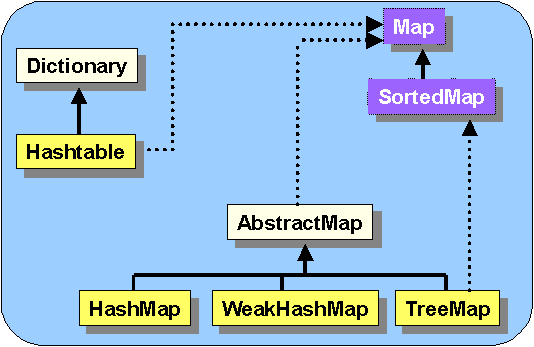
Here is the hierarchy showing most of the Map classes:
| 12.6 The Map Classes |
Hashtable
|
|
HashMap
|
|
TreeMap
|
|
WeakHashMap
|
Consider this code:
String[] names = {"Al", "Zack", "Sally", "Al", "Mel", "Zack", "Zack", "Sally"};Here we see that a HashMap is formed with keys being the names of the Team and values being the Teams themselves. This is the output:
HashMap aMap = new HashMap();// Fill up the collection
for(int i=0; i<names.length; i++) {
Team c = new Team(names[i]);
aMap.put(names[i], c);
}
// Now print out the elements
Iterator it;
System.out.println("Here are the keys:");
it = aMap.keySet().iterator();
while (it.hasNext())
System.out.println(" " + it.next());System.out.println("Here are the values:");
it = aMap.values().iterator();
while (it.hasNext())
System.out.println(" " + it.next());System.out.println("Here are the key/value pairs:");
it = aMap.entrySet().iterator();
while (it.hasNext())
System.out.println(" " + it.next());
| Here are the keys:
Sally Zack Mel Al Here are the values: The Sally has 0 points and played 0 games. The Zack has 0 points and played 0 games. The Mel has 0 points and played 0 games. The Al has 0 points and played 0 games. Here are the key/value pairs: Sally=The Sally has 0 points and played 0 games. Zack=The Zack has 0 points and played 0 games. Mel=The Mel has 0 points and played 0 games. Al=The Al has 0 points and played 0 games. |
Notice that there are only 4 keys, even though we added many items....this is because one key overwrites another when we call the put method more than once with the same key.
If we replace the HashMap with a TreeMap in the above
code, the code still works, we just get the items in sorted ored according
to the keys:
| Here are the keys:
Al Mel Sally Zack Here are the values: The Al has 0 points and played 0 games. The Mel has 0 points and played 0 games. The Sally has 0 points and played 0 games. The Zack has 0 points and played 0 games. Here are the key/value pairs: Al=The Al has 0 points and played 0 games. Mel=The Mel has 0 points and played 0 games. Sally=The Sally has 0 points and played 0 games. Zack=The Zack has 0 points and played 0 games. |
Using WeakHashMap, you won't notice a difference.
We will not talk about this class further.
| 12.7 The "Collections" Class |
Here are two VERY useful ones:
Object max, min;
max = Collections.max(aCollection);
min = Collections.min(aCollection);
System.out.println("Max
= " + max + ",
Min = " + min);
| Max = Zack, Min = Al |
Note that this will work as well if we had collections of wrapper class objects such as Integers. But what about arbitrary objects ? How does Java know how to compare arbitrary objects for max and min ? For example, what if we had stored Team objects in the ArrayList:
for(int
i=0; i<names.length; i++)
aCollection.add(new Team(names[i]));
If we try to find the max or min this way, we get a ClassCastException. This is because Java assumes that for the max and min methods to work (as well as many other Collections class methods), the objects in the collection MUST implement the Comparable interface which is defined as follows:
public interface Comparable {So, we have to make Team class implement this interface:
public int compareTo(Object o);
}
public class Team implementsComparable {and also, we must write the compareTo() method which returns a negative integer, zero or a positve integer indicating whether the receiver object is less than, greater than or equal to the object which is passed in as a parameter, respectively. When writing such a method, you should ensure that:
...
}
public int compareTo(Object obj) {If we now make an ArrayList (or any other kind of collection) with some Team objects with various numbers of points, we can then ask the ArrayList for the maximum and minimum. Assuming that we re-organized our list of teams in the League class to be an ArrayList instead of an array, we could then rewrite out firstPlaceTeam() and lastPlaceTeam() methods as follows:
if (!(obj instanceof Team))
throw new ClassCastException();
Team t = (Team)obj;
if (this.totalPoints() < t.totalPoints())
return -1;
if (this.totalPoints() > t.totalPoints())
return 1;
return 0;
}
public Team firstPlaceTeam() {Note that we can simplify the above compareTo() method as follows:
return (Team)Collections.max(getTeams());
}
public Team lastPlaceTeam() {
return (Team)Collections.min(getTeams());
}
public int compareTo(Object obj) {But what if we wanted to change the "meaning" of max and min to say that the minimum is the team with the first name alphabetically and the maximum is the one with the last name alphabetically ? We can simply re-write the compareTo() method:
if (!(obj instanceof Team))
throw new ClassCastException();
return (totalPoints() - ((Team)obj).totalPoints());
}
public int compareTo(Object obj) {Note that this method makes use of the compareTo() method in the String class to compare the names. Also, note that we cannot use our new firstPlaceTeam() and lastPlaceTeam() methods as we changed them since they now ignore all point issues.
if (!(obj instanceof Team))
throw new ClassCastException();
return (getName().compareTo(((Team)obj).getName));
}
These are some more useful methods for re-organizing a list:
String[] names = {"Al", "Zack", "Sally", "Al", "Mel", "Zack", "Zack", "Sally", "Jim", "Orson", "Ash"};Here is the output:
ArrayList aCollection = new ArrayList();
for(int i=0; i<names.length; i++)
aCollection.add(names[i]);System.out.println(aCollection);
Collections.reverse(aCollection);
System.out.println(aCollection);
Collections.shuffle(aCollection);
System.out.println(aCollection);
Collections.sort(aCollection);
System.out.println(aCollection);
| [Al, Zack, Sally, Al, Mel, Zack, Zack, Sally,
Jim, Orson, Ash]
[Ash, Orson, Jim, Sally, Zack, Zack, Mel, Al, Sally, Zack, Al] [Al, Ash, Orson, Sally, Zack, Mel, Al, Jim, Zack, Sally, Zack] [Al, Al, Ash, Jim, Mel, Orson, Sally, Sally, Zack, Zack, Zack] |
Wow! These sure are useful methods. Guess what ? The sort method requires that the objects all be comparable. So, we can sort our Teams again according to the criteria specified in the implementation of the compareTo() method.
As you will see in a later course, searching a sorted list can be done much quicker by using a binary search rather than a linear search. The following method allows you to search for a particular item (the key) in a sorted list (it assumes that the list has already been sorted previously). It is actually VERY fast. The method returns the index of the item within the list, unless it is not there, in which case -1 is returned.